Line sensors - using 2 sensors and detecting fall-off.
Pin numbers and GPIO
The two phototransistor detectors are connected to the Pico at pins 31, and 32.
Pin32 (GPIO27) is the left sensor
The Python command to set it up is:
lfront = ADC(Pin(27))
Pin31 (GPIO26) is the right sensor
The Python command to set it up is:
rfront = ADC(Pin(26))
Reading the values.
The Python commands to read the left and right sensors are:
Left = lfront.read_u16()
Right = rfront.read_u16()
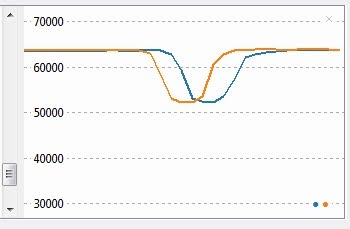
These will give values between 52000 and 64000, as the sensors cross from black to white over the line,
with a smaller value for white
Use Thonny to see the graph:
Calibration
It is a good idea to calibrate the readings so that the maximum value is reduced to 100 and the minimum reduced proportionately to 0. Also to have black a small number, and white a large number. See below for calibrated readings.
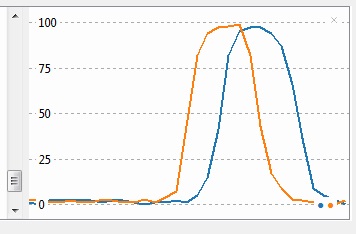
Calibrated = 100 * (maximum - value) /(maximum-minimum)
#Calibrate:
Lmax = max(Lmax,Left)
Rmax = max(Rmax,Right)
Lmin = min(Lmin,Left)
Rmin = min(Rmin,Right)
if (Lmax != Lmin):
Left = int(100*(Lmax-Left)/(Lmax-Lmin))
if (Rmax != Rmin):
Right= int(100*(Rmax-Right)/(Rmax-Rmin))
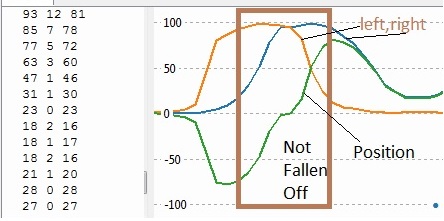
After calibration, we can use about 20 as the value at which the sensor has "fallen off" the line.
100 is pure white, and near zero is black.
____________________________________________________________________________________________
Reading the position over the line
Simple method
The simple approach is:
Position = Left - Right
At the centre of the line, both sensors give a calibrated value of approx 100, so the position is 0
To the right
the right sensor begins to lose output so the position value becomes positive.
To the left,
the left sensor begins to lose output so the position value becomes negative.
Detecting falling off
If both sensors see black, the position calculated returns to zero, with the simple calculation.
You can detect you have fallen off when either input has fallen below 20.
This is the central rectangle area shown above.
Remembering which side we fell off
If you keep the previous calculated position (oldposition) then when fall-off is detected,
the position can be calculated as +70 or - 70,
depending on whether "oldposition" is positive or negative.
This is then to be kept as the new oldposition.
if (Left<20)or(Right <20):
if (Oldposition <0):
Position =-70
else:
Position =70
Oldposition = Position
 _________________________________________________________________________________
Extended method
News 2026:
I'm working on a method of automatically calculating the value of FOerror below.
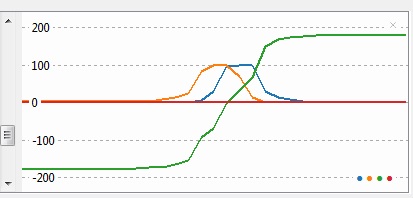
The region in which Position can be calculated, is extended to when either reading is above 20
(as opposed to both readings having to be above 20)
The central region is treated as the simple method, but when one sensor is above 20 and the other is not,
the position is calculated from the reduction in value of the remaining sensor.
if (l>25 and r>25):
error = l-r
else:
if olderror >0:
error = FOerror -(l+r)
else:
error = -FOerror + (r+l)
_____________________________________________________________________________
Whole program:
from machine import ADC,Pin
import time
rfront = ADC(Pin(26)) # HW31 right front sensor
lfront = ADC(Pin(27)) # HW32 left front sensor
Lmin=65535
Rmin=65535
Lmax = 0
Rmax=0
Position=0
Oldposition =0
FOerror = 180
while True:
Left = lfront.read_u16()
Right = rfront.read_u16()
#Calibrate:
Lmax = max(Lmax,Left)
Rmax = max(Rmax,Right)
Lmin = min(Lmin,Left)
Rmin = min(Rmin,Right)
if (Lmax != Lmin):
Left = int(100*(Lmax-Left)/(Lmax-Lmin))
if (Rmax != Rmin):
Right= int(100*(Rmax-Right)/(Rmax-Rmin))
if (Left>25 and Right>25):
Position = Left - Right
else:
if olderror >0:
Position = FOerror -( Left + Right)
else:
Position = -FOerror + ( Left + Right)
time.sleep(0.05)